저장소 클론
- OpenStack i18n 저장소 클론
- 실행 명령어 : git clone <https://opendev.org/openstack/i18n.git

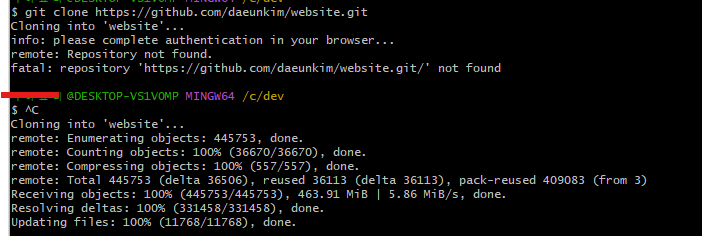
- Kubernetes website 저장소 fork / clone
- 실행 명령어 : git clone <https://github.com/myusername/website.git>
🔹 Extra 과제
- git-review 설치
- Python 설치→ Add Python to PATH 체크 → Install Now
- https://www.python.org/ftp/python/3.12.5/python-3.12.5-amd64.exe
- 설치 확인
- python --version pip --version
- git-review 설치
- pip install git-review
- 설치 확인
- git review --version
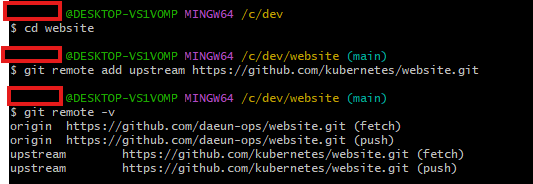
- remote 설정
- origin → 본인 포크 저장소
- upstream → 원본 저장소 (kubernetes/website)
- https://github.com/daeun-ops/website
GitHub - daeun-ops/website: Kubernetes website and documentation repo:
Kubernetes website and documentation repo: . Contribute to daeun-ops/website development by creating an account on GitHub.
github.com
OpenStack과 Kubernetes의 기본 환경을 세팅하며 전체적인 흐름을 이해할 수 있었습니다.
Zanata와 Slack, IRC 등 다양한 커뮤니케이션 도구를 직접 사용해보니 실무 분위기를 경험할 수 있었습니다.
앞으로의 번역과 개발 작업에 좋은 밑거름이 될 것 같고 앞으로 좀 더 실질적인 번역 실습에 집중하고 싶습니다!
'DevOps > OpenStack' 카테고리의 다른 글
| [DevStack 1편] 내가 직접 만드는 클라우드, OpenStack 한눈에 보기! (0) | 2025.10.25 |
|---|---|
| Openstack .pot 파일 생성해보기! (0) | 2025.10.25 |
| 본격 OpenStack i18n CI 구조 분석 ! (0) | 2025.10.25 |
| WSL 설치 및 Ubuntu 설정 + zanata.ini 구성 + 번역 파일 Pull 받아오기! (3) | 2025.10.25 |
| OpenStack 오픈소스 기여의 첫 시작으로 Zanata 계정 생성하기 (0) | 2025.10.18 |